
How to Make a Resume with ChatGPT: 7 Easy Steps (Free Guide)
Learning how to make a resume with ChatGPT can save you hours. Writing a resume is stressful. You stare at a blank page, you are not sure which skills to list, and you worry that your experience sounds too ordinary. The good news is that ChatGPT can do most of the heavy lifting for you, for free, in about 20 to 30 minutes.
In this guide you will learn exactly how to make a resume with ChatGPT, step by step, even if you have never written one before. You will get copy-and-paste prompts, a simple structure that works for almost any job, and the mistakes that make AI-written resumes easy to spot.
What You Need Before You Make a Resume with ChatGPT
You do not need a paid plan to write a resume with ChatGPT. The free version of ChatGPT is enough for everything in this guide. Before you open it, collect this information in a notes file:
- The job title you are applying for (and the job post, if you have one)
- Your education: degree, institute and year
- Your work history: job title, company, dates and what you did day to day
- Skills you actually have, including software you can use
- Any projects, certificates, freelance work or volunteer work
- Languages you speak
Important: do not paste your CNIC or ID number, full home address, passwords or bank details into ChatGPT. A resume only needs your name, city, phone number, email and (optionally) a LinkedIn or portfolio link, and you can add those yourself at the end.
Step 1: Start Your Resume with ChatGPT by Giving the Right Context
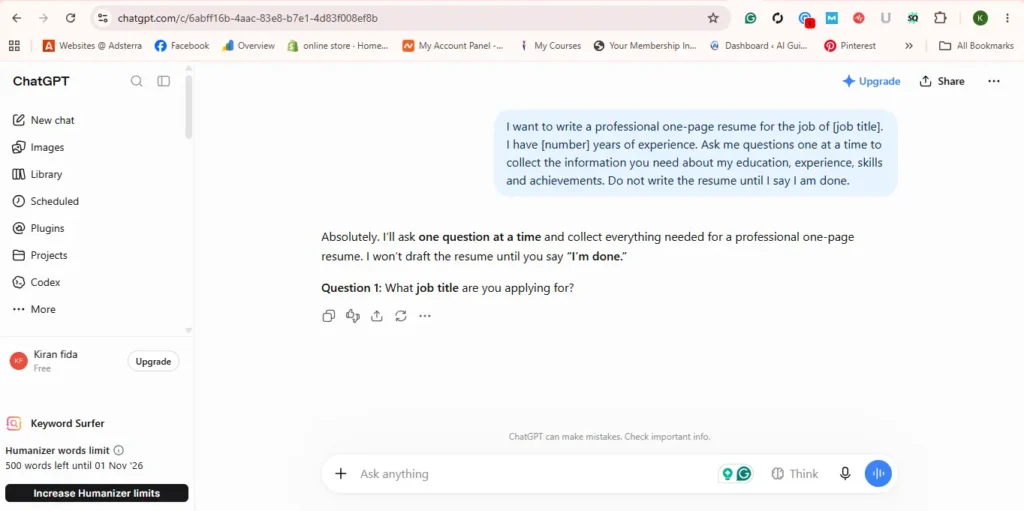
The biggest mistake beginners make is typing “make my resume” and nothing else. ChatGPT then invents a generic resume full of empty phrases. Start by telling it who you are and what job you want. Copy this prompt and fill in the brackets:
I want to write a professional one-page resume for the job of [job title]. I have [number] years of experience. Ask me questions one at a time to collect the information you need about my education, experience, skills and achievements. Do not write the resume until I say I am done.
This “interview” approach works much better than writing everything at once, because ChatGPT asks about details you would forget, such as numbers, tools, and results.
Step 2: Answer the Questions Honestly and With Numbers
Answer each question in simple words. You do not need perfect English, ChatGPT will clean it up. What matters is that your answers are true and specific. Compare these two answers:
If you want another pass at tightening the wording before you finalize it, our AI Content Rewriter can help clean up phrasing.
- Weak: “I handled social media for a shop.”
- Strong: “I managed the Facebook and Instagram pages for a clothing shop for 8 months, posted 5 times a week and grew followers from 1,200 to 4,500.”
Numbers (time, money, percentages, number of clients or students) make any resume stronger. If you do not remember an exact figure, give a careful estimate and say it is an estimate, rather than inventing one.
Step 3: Choose the Right Resume Format
When you have answered all the questions, tell ChatGPT which format to use. For most people there are three options:
- Chronological: your most recent job first. Best if you have steady work experience.
- Skills-based (functional): groups your skills first. Useful for fresh graduates or career changers.
- Combination: a skills summary at the top, then your work history. A safe choice for freelancers.
Then use this prompt:
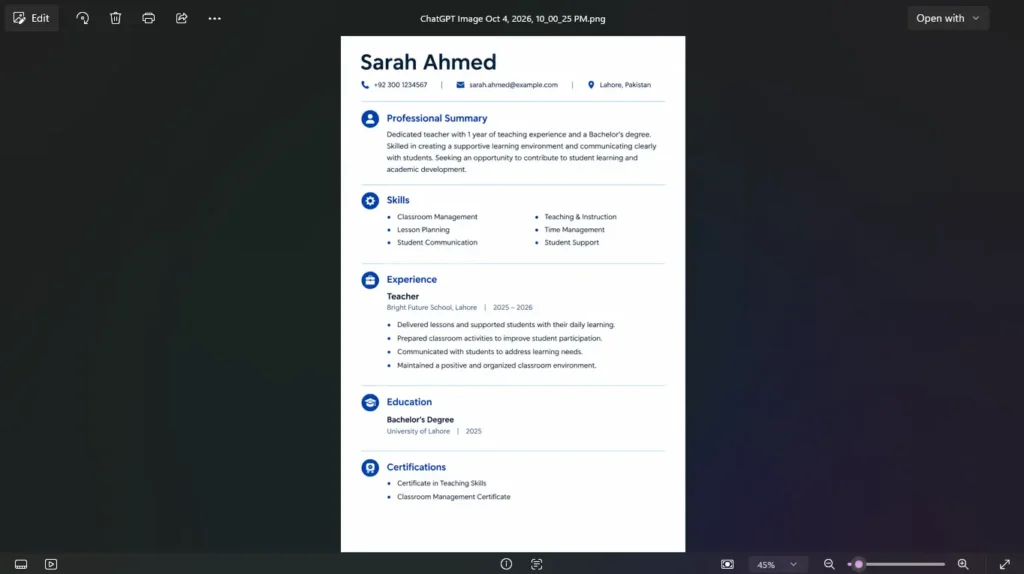
Now write my resume in a [chronological / skills-based / combination] format. Keep it to one page. Use these sections: Name and contact, Professional Summary (3 lines), Skills, Experience, Education, Certifications. Use bullet points that start with action verbs and include the numbers I gave you. Use simple language and do not add anything I did not tell you.
The last sentence is important. It stops ChatGPT from adding skills or achievements that you do not have.
Step 4: Match Your Resume with ChatGPT to the Job Post
When you build a resume with ChatGPT, this step is the one most people skip. Many companies use software called an ATS (Applicant Tracking System) to filter resumes before a human reads them. These systems look for keywords from the job description. If you have the job post, paste it into ChatGPT with this prompt:
Here is the job description: [paste]. Compare it with my resume. List the important keywords and skills from the job post that are missing from my resume. Then update my resume to include only the ones that are true for me.
Read the list carefully. If ChatGPT suggests a skill you do not actually have, leave it out. Getting an interview with a false skill usually ends badly in the interview itself.
Step 5: Write a Strong Professional Summary
The 3-line summary at the top is the first thing a recruiter reads. Ask ChatGPT for options instead of accepting the first one:
Write 3 different versions of my professional summary. Each should be under 50 words, mention my main skill, my years of experience and one real achievement. Avoid words like passionate, hardworking and dynamic.
To check you’re actually under that 50-word limit before you paste the summary in, run it through our Word & Character Counter.
Pick the version that sounds most like you, then change a few words so it reads naturally. Recruiters see generic AI summaries every day, so a small personal touch makes a big difference.
Step 6: Design and Download Your Resume
ChatGPT gives you the text, not a finished design. To turn it into a clean PDF, you have a few free options:
- Google Docs: open the template gallery, choose a resume template, and paste your sections in. Download as PDF.
- Canva: search “resume”, pick a simple template, and replace the text. Avoid heavy graphics and photos in columns, because some ATS software cannot read them.
- Microsoft Word: use one of the built-in resume templates if you have Word installed.
Whichever tool you use, keep one clear font, enough white space, and a single page if you have less than about 8 to 10 years of experience. Save the file with a professional name such as Ayesha-Khan-Resume.pdf.
Step 7: Proofread With ChatGPT, Then With Your Own Eyes
Paste the final text back into ChatGPT with this prompt:
Check this resume for spelling, grammar, inconsistent dates, repeated words and anything that sounds exaggerated. List the problems first, then give me the corrected version.
After that, read the resume out loud once yourself, and if possible, ask a friend or teacher to read it too. AI misses things, especially wrong dates and company names.
A tip from our side: after ChatGPT finishes, the one change we always recommend making yourself is the professional summary. ChatGPT likes to start with phrases like “results-driven and highly motivated professional”, which recruiters see on hundreds of resumes every week. Replace that opening with one plain sentence about what you actually do, for example: “Freelance content writer with 2 years of experience writing blog posts for tech websites.” It sounds less fancy, but it is clear, honest, and much easier for a recruiter to remember.
Mistakes That Make a Resume with ChatGPT Look Fake
- Buzzwords everywhere: phrases like “results-driven professional” and “synergy” in every line. Replace them with real facts.
- Invented achievements: ChatGPT sometimes fills gaps with numbers you never gave it. Check every figure.
- Same resume for every job: spend 5 minutes adjusting it for each application using Step 4.
- Too long: two or three pages for a junior role. Ask ChatGPT to shorten it to one page.
- Wrong spelling style: decide on British English (CV, organisation) or American English (resume, organization) and keep it consistent.
Resume vs CV: Is There a Difference?
In the United States and Canada, a resume is a short 1-2 page summary for jobs, while a CV is a longer academic document. In Pakistan, the UK, the Middle East and many other countries, people use the word CV for both. If a job post asks for a CV, a well-made one-page resume is usually exactly what they want, unless it is an academic or research position.
Bonus: Use ChatGPT for Your Cover Letter Too
Once your resume is ready, you can ask ChatGPT for a short cover letter in the same chat:
Using my resume and the job description above, write a cover letter under 250 words. Make it specific to this company and mention two of my real achievements.
As with the resume, edit it so it sounds like you before you send it.
Frequently Asked Questions
Is it okay to write a resume with ChatGPT?
Yes. Using ChatGPT as a writing assistant is fine, just like using a template or asking a friend for help. What matters is that every fact on the resume is true and that you review and edit the final version yourself.
Can recruiters tell if a resume was written by AI?
They can often spot generic, buzzword-heavy resumes, whether written by AI or not. Specific numbers, real projects and your own wording make the resume look authentic.
Is the free version enough to make a resume with ChatGPT?
Yes. All the prompts in this guide work on the free version. You do not need a paid plan to build a good resume.
Should I add a photo to my resume?
It depends on the country and company. Many employers in the US and UK prefer resumes without photos, while some employers in Pakistan and the Gulf still expect one. If the job post does not say, a resume without a photo is the safer choice for ATS systems.
Final Thoughts
ChatGPT will not get you the job by itself, but it removes the hardest part of writing a resume: starting. Give it honest details, use the prompts above, match your resume to each job and always do a final check yourself. If you follow these steps, you can make a clean, professional resume with ChatGPT in less than an hour.
New to ChatGPT? Read our guide on How to Use ChatGPT for Beginners and our list of 100 Best ChatGPT Prompts for Beginners to get even better results.
More in AI Tutorials
How to Use ChatGPT for SEO: 12 Proven Tips for Beginners (2026)
Learn how to use ChatGPT for SEO in 2026. Discover practical ways to find keywords, create content, optimize on-page SEO, improve rankings, and avoid common mistakes. …
100 Best ChatGPT Prompts for Beginners
Discover the Best ChatGPT Prompts with 100 beginner-friendly ideas for writing, SEO, emails, business, learning, social media, and daily tasks. Quick Answer The best…
AI Prompting Guide: 8 Ways to Write Better Prompts in 2026
This practical AI prompting guide shows how to write better prompts for ChatGPT, Gemini, and Claude using simple formulas, examples, and smart techniques. AI…